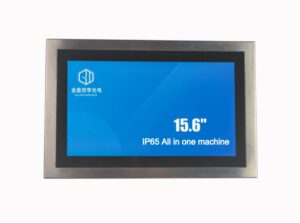
An IP65 Touch All-in-One PC combines an industrial touch display with an embedded computer. Engineers design this device for stable operation in harsh environments. It features a protection level that meets IP65 standards. This means it is dust-tight and resists water spray from any direction. The front panel usually has a fully sealed structure. This seal protects core components from moisture, dust, and liquid splashes.
The integrated design of the IP65 Touch All-in-One PC merges display, computing, and control into one body. It does not need an external host. This simplifies installation and wiring. It also improves system stability and maintenance efficiency. In terms of structure, an IP65 Touch All-in-One PC offers industrial reliability. It resists vibration and moisture while supporting continuous operation. Therefore, companies use it for production lines, human-machine interface (HMI), MES terminals, logistics systems, and outdoor equipment.
Seven Key Dimensions for Selection
You should not focus on only one parameter when buying an IP65 Touch All-in-One PC. Instead, evaluate seven core dimensions:
- Protection Level: Confirm if it meets the IP65 standard. Check if protection applies only to the front panel or the whole machine.
- Touch Type: Choose between capacitive or resistive screens based on gloves, moisture, or oil usage.
- CPU and Performance: Match the processor and memory to your application (HMI, MES, or vision systems).
- Screen Parameters: Consider size, resolution, and brightness, especially for outdoor use.
- Structure and Cooling: Prefer fanless designs for better stability and longer life in industrial settings.
- Interfaces and Expansion: Check for serial ports, network ports, and other industrial communication interfaces.
- Environmental Adaptability: Evaluate temperature range, vibration resistance, and electromagnetic compatibility.
1. Protection Level (The Core Metric)
The protection level is the most important factor for an IP65 Touch All-in-One PC. Standard IP65 usually means the front panel resists dust and water. However, the back and ports might not be fully sealed. A full-machine IP65 or IP66 rating means the entire unit is sealed. These models handle heavy washing and wet outdoor conditions. They cost more but provide higher reliability. Choose a full-machine IP65 Touch All-in-One PC for food processing or medicine production.
2. Touch Type (Determining Experience)
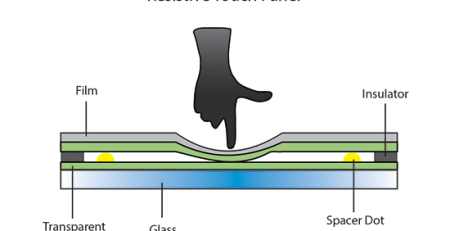
The touch type decides the user experience. Most models use either Projected Capacitive (PCAP) or Resistive touch. Capacitive screens support multi-touch and respond quickly. They work best for standard HMI applications. Resistive screens respond to pressure. They work well even if the user wears heavy gloves or if the screen has oil on it. Most modern industrial users prefer the capacitive IP65 Touch All-in-One PC for its smooth interaction.
3. CPU and Performance
You must match the CPU to your specific workload. An IP65 Touch All-in-One PC with an Intel Celeron or J-series processor handles light tasks like data collection. If you run SCADA systems or machine vision, choose Intel Core i3, i5, or i7 processors. These handle high data loads and complex graphics. Some models offer 8GB of RAM or more. This setup balances power and stability for high-load industrial use.
4. Screen Parameters
Size, resolution, and brightness affect the daily use of an IP65 Touch All-in-One PC. Common sizes include 10-inch, 15.6-inch, and 21.5-inch models. Small screens fit into embedded cabinets. Large screens work better for monitoring. We recommend at least 1080P resolution for clear images. For indoor use, 300–500 nits of brightness is enough. However, an outdoor IP65 Touch All-in-One PC needs 1000 nits or more to stay visible under direct sunlight.
5. Structure and Cooling
Structure and cooling determine the lifespan of the device. A fanless design is now the standard for a high-quality IP65 Touch All-in-One PC. It uses metal fins and the outer shell to dissipate heat. This prevents dust and moisture from entering the body. Most shells use aluminum alloy for good heat conduction and strength. Food and pharma industries often choose stainless steel for better hygiene. Fanless structures reduce maintenance costs significantly.
6. Interfaces and Expansion
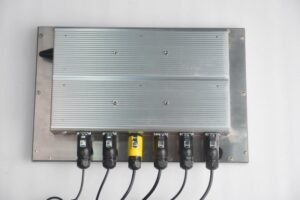
Expansion capability is vital for connecting your system. Check for industrial ports like RS232 and RS485 to link with PLCs and sensors. A good IP65 Touch All-in-One PC should offer dual LAN ports for network redundancy. It also needs USB and video outputs like HDMI or VGA. Some projects require GPIO or CAN ports for special controls. Always verify your connection needs before you buy.
7. Environmental Adaptability
Industrial sites have extreme conditions. A standard IP65 Touch All-in-One PC should operate between -20°C and 70°C. Commercial devices fail at these extremes. The unit must also resist vibrations from production machinery. It needs strong electromagnetic compatibility (EMC) to avoid data interference. Evaluate these factors to ensure long-term stability in the field.

Why Choose Goldenmargins?
Why should you select the Goldenmargins IP65 Touch All-in-One PC? Here are the reasons:
- Impact Protection: It features IK07 cover glass to resist external shocks.
- Optical Bonding: We use optical bonding between the touch screen and LCD. This improves display quality and protects against moisture and dust.
- Superior Viewing: The 15.6-inch screen offers wide viewing angles (89°/89°/89°/89°).
- High Brightness: You can choose up to 1000 cd/m² brightness. This makes the IP65 Touch All-in-One PC clear in outdoor light.
- High Resolution: The 1920×1080 Full HD resolution provides sharp images.
- 24/7 Operation: We design it for continuous use. The backlight lasts for 30,000 hours.
- Wide Temperature: It works reliably from -20°C to 70°C.
- 10-Point Touch: The capacitive technology supports 10-point multi-touch for smooth operation.
- Special Coatings: The glass includes Anti-Reflection, Anti-Glare, Anti-Fingerprint, and UV/IR blocking treatments.
- Aviation Interfaces: It uses aviation-grade connectors for DC power, RJ45, RS232/RS485, USB, and HDMI.
This IP65 Touch All-in-One PC is perfect for industrial automation, outdoor kiosks, special vehicles, and food processing.
Are you ready to upgrade your hardware? Explore the full Goldenmargins IP65 Touch All-in-One PC product page. You can also email our sales team at sales@goldenmargins.com or call +86 755 23191996.
Our team provides custom solutions for your specific projects. Contact us today for quotes, demos, and the latest stock offers for your next IP65 Touch All-in-One PC.